

MT4 FX Trader is a trend trading system already traditionally based on the main Buy/Sell indicator, whose signals are supported by an additional filter indicator and Trading dashboard. Three trading templates for different trading styles and no repainting of signals. That's short, now more.
Characteristics of the GT Scalper Trading System
-
Platform: Metatrader4
-
Currency pairs: Any currency pairs, recommended Major
-
Trading Time: Any, recommended London and New York trading sessions
-
Time Frame: M1 – M15
-
Recommended broker: Roboforex, XM, FTMO
Trading Modes
FXTR1 – high risk
This mode is more suitable for scalping. It is associated with a large number of signals and with increased risk. Not recommended for beginners.
FXTR2 – medium risk
This mode is the most balanced, has an average number of signals with an average risk and will suit most traders.
FXTR3 – conservative
This mode is for calm measured trading. Not high risk, few signals. For traders who are not ready to stare at the screen all day.
System overview
System contains three indicators. Every template has its 'own' 3 indicators, so please use the system template, as it loads up all the necessary indicators depending on your trading mode:
-
Entry/Exit Indicator
-
Bias indicator
-
Trading dashboard

How does it work
Entry Examples
Entry signals are very simple and can be visualized as follows:
BUY TRADE / SELL TRADE
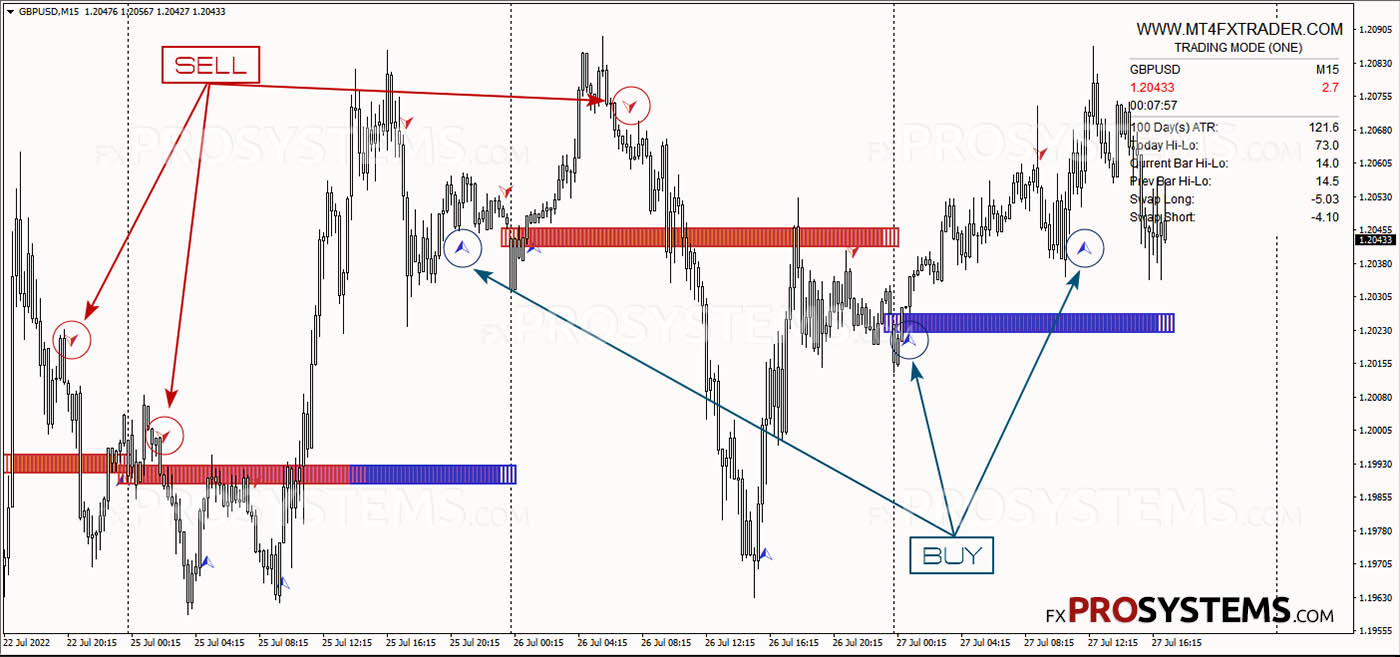
More examples:

Recommend to start with M15 TF to see how it works. Later you can switch to fastest M5 or M1.
Software provides easy signals. When we see the blue bias indicator, we take BUY signals only.
The same goes for sell signals, when we see the red bias indicator, we take SELL signals only.
Bias change
Sometimes when there is a sudden market change, or the price simply does not 'respect' our calculated bias, it can change during the day.
On the below example we can see that the day started 'red' while it turned into 'blue' later. Please don't worry, as bias indicator does not repaint or redraw. If it's calculations are 'wrong' for any particular day (as none of the indicators are always right), it will just change it's color, so you can still try to make pips this day.
See this video for more details:

Stop loss order should be placed in the technically best place:
-
The last swing high (for the SELL trade)
-
Last swing low (for the BUY trade)
-
At the round number
-
Close to important support/resistance area
Of course, a modern trading system is inconceivable without an advanced alert system, so MT4 FX Trader is completely in order with this. You can see the Alert, set up notifications for Email, mobile notification or platform pop-ups:

Handful of advice
-
I recommend to use the system on M5 or M15 timeframe.
-
M15 is the best timeframe to start with, as it provides less signals and it's easier to control the risk
-
You can use our entry (arrow) indicator, but if you are looking for faster/slower or simply different signals, you can try with your own entry/exit favorite indicator
-
Do not overtrade, try to track 1-4 of your favorite trading instruments
In the archive MT4_FX_Trader.rar (998.8 KB):
-
EN1.ex4
-
EN2.ex4
-
EN3.ex4
-
FXTRADER1.ex4
-
FXTRADER2.ex4
-
FXTRADER3.ex4
-
FXTRADERDash1.ex4
-
FXTRADERDash2.ex4
-
FXTRADERDash3.ex4
-
FXTR1.tpl
-
FXTR2.tpl
-
FXTR3.tpl
-
FX TRADER Manual.pdf